
Overview
Information systems are the technology and processes public sector entities use to manage information and deliver services for the community. These systems are critical state assets and entities must actively maintain and secure them to ensure their effectiveness, dependability, and resilience.
Through our information systems audit program, we form opinions about the security and reliability of key information systems in ensuring entities’ financial data is protected and can be relied upon for financial reporting.
Tabled 19 November 2026.


Report on a page
This report summarises issues identified in our information systems audits for state entities in Queensland’s public sector. We discuss information technology (IT) control weaknesses, control maturity, a major financial system implementation, and challenges associated with ageing legacy systems.
Queensland public sector entities include the 21 core government departments (referred to as ‘departments’ in this report), statutory bodies, and government owned corporations.

| IT control weaknesses are increasing security risks |
While entities generally have effective IT controls for finance systems, the IT control environment is under pressure due to recurring weaknesses. Addressing these weaknesses can be complex and time-consuming and is affected by dependencies on major projects and third parties, legacy technology constraints, and the governance and behavioural changes required to embed new controls. As a result, entities often need to rely on interim measures or accept residual risks while working towards a sustainable long-term solution.


| Access controls continue to require improvement |
Entities have improved some identity and access controls. However, they are not embedding strong processes to ensure that changes are not being treated as a one-off remediation activity.

| Large system implementation for departments is underway |
Many entities are undergoing major projects for digital transformation. Queensland Shared Services is leading a large and complex implementation of a finance system that many departments will use. It will result in transformed processes for Queensland Shared Services and the user departments. We have highlighted common areas of risk relating to system implementations, including decision making during design and testing.

| Legacy system funding of $288 million allocated |
The Queensland Government has allocated $414 million of its $1 billion digital fund (40 per cent), with $288 million allocated to projects aimed at addressing legacy systems. Gaps remain in data collection and reporting on IT projects, and departments do not consistently manage legacy risks.
1. Information technology controls at state entities
This chapter presents an overview of our 2026 audits of information technology (IT) controls at state entities. We report on the effectiveness of key IT controls relevant to financial reporting, including entities’ progress in addressing control deficiencies identified in prior years.
Effective IT controls are critical because government entities rely on IT systems to process, store, and report financial information. These systems support the recording of financial transactions and account balances that underpin entities’ financial statements. As entities increasingly adopt third-party and cloud-based technologies, robust governance and security controls remain essential to protect information assets and maintain the integrity of financial reporting.
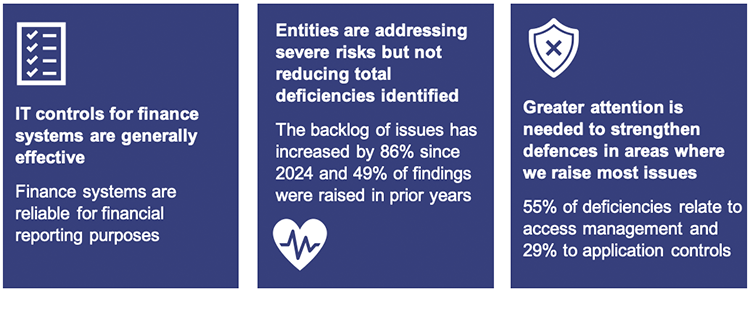
While entities generally have effective IT controls supporting financial reporting, many continue to have unresolved and recurring control deficiencies. Although remediation is progressing, addressing IT weaknesses can be complex due to project dependencies, third-party providers, legacy systems, and the governance and behavioural changes needed to embed new controls. As a result, entities may rely on interim controls or accept residual risks while implementing longer-term solutions.
Chapter snapshot
Maintaining effective IT controls needs to remain a priority
Government services need secure and reliable technology. While entities generally have effective IT controls for finance systems, IT threats change and become more sophisticated. Effective controls protect their systems, data, and critical services from threats such as cyber-attacks and data loss.
Strong governance, effective controls, and timely action help organisations build IT resilience and aid the recovery of systems and data when cyber-attacks, data loss, or other disruptions occur.
The overall IT control environment remains under pressure
Entities have made good progress in addressing findings relating to significant deficiencies and their potential impact on security and financial reporting. However, the total number of unresolved deficiencies requires attention. The cumulative impact of unresolved deficiencies could increase overall risk if they are not addressed over a longer period.
Entities should focus on strengthening their overall control environment by:
- resolving findings more quickly and preventing long-standing issues from increasing operational and compliance risks
- strengthening security controls and improving accountability for remediation activities and issue management processes
- addressing the root causes of findings, particularly those caused by gaps in processes
- ensuring effective security controls are in place across all systems, not just those reviewed through our audit program.
Figure 1A details the deficiencies commonly found in the internal controls of IT systems.
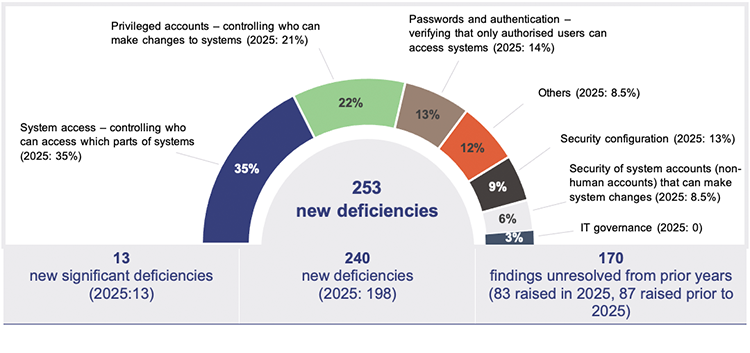
Queensland Audit Office from our 2025 and 2026 audits.
In 2026, we identified 13 new significant deficiencies and 240 new deficiencies in IT system controls. Significant deficiencies are serious control weaknesses that require immediate attention and corrective action. Deficiencies exist when controls are missing or not working properly.
The number of new significant deficiencies remains unchanged from last year, while the number of deficiencies increased by 21 per cent.
As in previous years, most findings relate to managing system access, privileged accounts, passwords and authentication, and security configuration.
Figure 1B shows the key factors contributing to the new deficiencies we identified in IT systems.
| Improved audit and testing techniques aligned to vendor best practices Enhanced testing procedures and more robust assessment criteria identified control gaps not previously detected |
| Cloud and technology transformation The use of new technologies and ongoing digital transformation initiatives introduced new risks and control gaps |
| Expansion of scope through new systems and applications Broader audit coverage included systems, applications, or business processes that were not previously reviewed |
| Rotation of control testing coverage In a risk-based testing approach, controls and processes not assessed in prior years may be tested this year |
| Organisational change Changes in roles, responsibilities, or key personnel affected the design and operation of controls |
Queensland Audit Office from our 2026 audits.
Entities continue to carry a large backlog of findings. This backlog includes new findings raised during 2026 that the entities are still addressing and older findings that were not resolved by their agreed due dates. While some newer findings are still within their agreed remediation period, all open findings require attention and contribute to the overall backlog of work that entities need to complete.
Entities continue to experience remediation delays
Entities remediated 63 per cent of information systems findings raised in 2025. Many issues, particularly significant deficiencies, have remained open for longer than intended, increasing the risk that information systems are not protected and operating as intended.
Figure 1C shows the factors contributing to the complexity of remediating significant deficiencies identified during our audits.
Different remediation drivers can affect an entity's ability to implement and sustain corrective actions. For example, deficiencies that require broader organisational change or depend on future projects were more likely to experience delayed remediation. Deficiencies that involve solution design uncertainty were more likely to have an unclear remediation pathway, while those managed through manual controls or risk acceptance may face ongoing sustainability challenges.
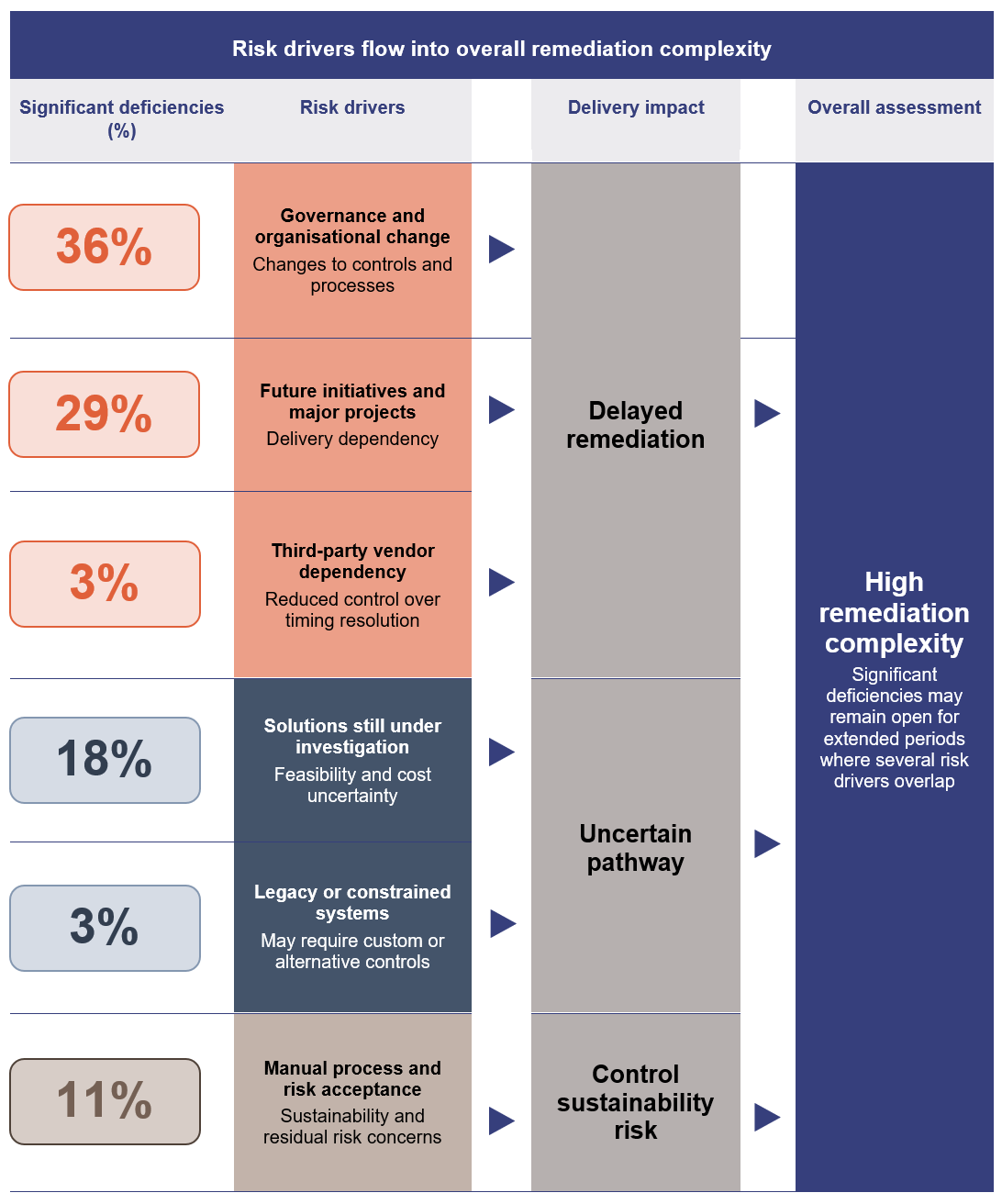
Queensland Audit Office from management responses on outstanding significant deficiencies as of 2026.

| To help entities and audit committees better understand risks and assess whether remediation plans are realistic and likely to deliver the intended outcomes, we have included some key questions in Appendix D to monitor the progress and effectiveness of remediation activities. |
Figure 1D outlines the key risks associated with each identified risk driver. Understanding these risks helps explain why some remediation activities may be delayed, less effective, or difficult to sustain.
Remediation risk drivers | Associated risk |
|---|---|

Governance and organisational change |
|

Future major projects |
|

Third-party dependency |
|

Solution still under investigation |
|

Legacy or constrained systems |
|

Manual process and risk acceptance |
|
Queensland Audit Office from management responses on outstanding significant deficiencies as of 2026.
The opportunities below highlight key areas that all entities should consider to improve remediation outcomes, reduce the number of long-standing findings, and strengthen their control environment over time.

| Opportunities to improve remediation effectiveness and reduce outstanding findings Entities should:
|
Strengthening identity, access, and application controls should be a key focus
We identified 367 deficiencies (55 per cent of overall deficiencies) relating to identity and access management and 191 deficiencies (29 per cent of overall deficiencies) relating to application controls.
Identity and access management controls form the first line of defence against cyber threats. When these controls do not operate effectively, organisations may not be able to restrict access to systems and information to unauthorised users, increasing the risk of cyber incidents, data breaches, fraud, and disruption to business operations. The Australian Signals Directorate reported that, in 2024–25, 42 per cent of cyber incidents involved compromised accounts or credentials.
We identified 86 deficiencies relating to security controls over IT infrastructure, for example, databases and operating systems. These weaknesses may expose entities to security vulnerabilities, malware, service disruptions, and unauthorised access to information.
Figure 1E shows the common IT controls and associated risks identified through our audits.
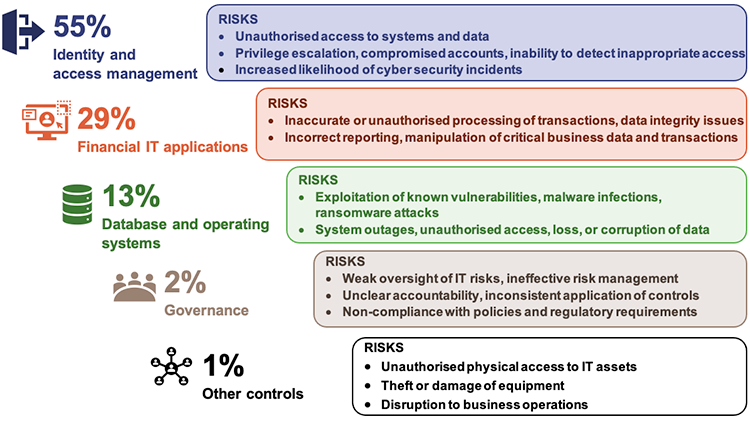
Queensland Audit Office from our 2026 audits.
Entities need to actively manage security risks in cloud environments
Many entities use cloud services to support critical business functions and store sensitive information. While there are benefits for cloud services, they also introduce security risks that entities must actively manage.
Our 2026 audits identified that 85 per cent of deficiencies relate to identity and access management, security monitoring, and user privilege management. These risks can be amplified in cloud environments where entities operate under a shared-responsibility model. While cloud service providers are responsible for securing the underlying cloud platform, entities remain responsible for managing user access, protecting information, monitoring security events, and complying with legislative and policy requirements.
In our report Information Systems 2025 (Report 6: 2025–26), we highlighted the importance of managing cyber security risks associated with third-party service providers. As more critical systems and information move to the cloud, effective management of these risks becomes increasingly important to maintain secure and resilient information systems.
Figure 1F illustrates how security responsibilities are commonly shared between cloud service providers and entities.
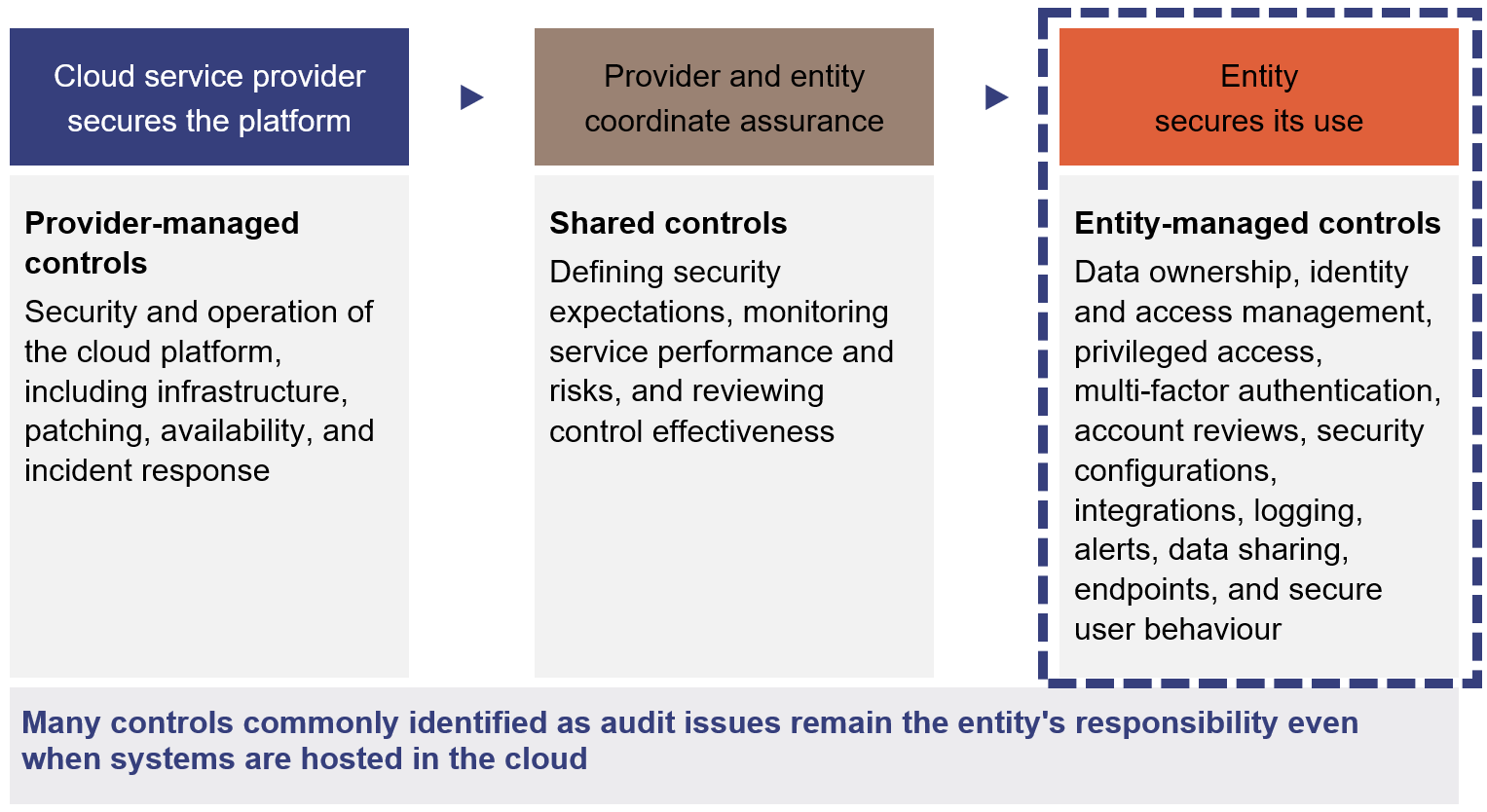
Queensland Audit Office from Microsoft guidance on shared responsibility in the cloud and Cloud Security Alliance guidance on shared responsibility in cloud.
The Australian and Queensland governments provide a range of frameworks, policies, standards, and guidance to help entities manage cyber security and third-party cyber security risks.
Our report Managing third-party cyber security risks (Report 13: 2025–26) highlights better practice approaches for identifying, assessing, monitoring, and managing third-party risks. These approaches include understanding supply chain risks, conducting risk assessments, implementing appropriate controls, and regularly monitoring third-party arrangements.
By following these practices, entities can better manage cyber security risks and ensure risks remain within acceptable levels.
The case study in Figure 1G shows that establishing a framework is only the first step in managing third‑party cyber security risks. Entities must also consistently undertake risk assessments and assurance activities. Without them, entities may not have enough visibility over third-party risks or confidence that controls are effectively protecting against unauthorised access, data breaches, security incidents, and weaknesses in system administration.
| Third-party risk assessment framework established but not operationalised |
|---|
In response to an audit observation in 2024, a Queensland Government department introduced a third-party risk management framework to strengthen how it identifies, assesses, and manages cyber security risks from third-party vendors. The entity planned to use the framework to assess both existing vendors and new third-party engagements. However, by 2026, the entity had not completed assessments for existing or new vendors. In 2026, the entity implemented a new public-facing system that relies on a cloud service managed by an external vendor. Although the contract required the vendor to maintain recognised security standards and provide assurance over its security practices, the department did not obtain an independent controls assurance report and did not implement other measures to verify the vendor's controls were operating effectively. The entity did not complete a formal assessment of the vendor's security controls, despite previously identifying this as one of the actions for managing third-party risk. As a result, the entity does not know whether there are adequate controls in place to secure the system and data. |
Queensland Audit Office from our 2024, 2025, and 2026 audits.
Independent assurance reports are one of the main ways entities can gain confidence that controls are in place and operating as expected. These reports are independently prepared and assess the design and the effectiveness of a service providers’ controls. These reports provide valuable insight into how vendors manage key risks, including access management, privileged accounts, change management, incident response, data protection, and service availability.
Assurance reports are particularly important when entities use cloud-based or outsourced technology services because they provide independent evidence that vendor controls are operating effectively and reduce the need for entities to perform their own detailed assessments.
|
| To better assist entities that are using cloud applications, we have listed the different types of assurance reports and the purposes they serve in Appendix E. |
The guide in Figure 1H helps entities to assess third-party assurance reports and determine whether they provide sufficient assurance over vendor controls.
| Area | Questions for entities |
|---|---|

Selecting the right report |
|

Contract requirements |
|

Annual review and monitoring |
|
Queensland Audit Office.
|
| Opportunities for entities to strengthen governance of cloud environments Entities should:
|
2. Maturity assessment of general IT controls
This chapter details the results of our general information technology controls (GITC) assessment for 5 selected departments. This is the first time we have performed a GITC maturity assessment.
A GITC maturity assessment, based on a GITC audit, focuses narrowly on selected information technology (IT) systems, access management, applications, databases, and change procedures to ensure the security and integrity of systems and data. It is a subset of the broader information security management system (ISMS) used to systematically manage organisation-wide information security risks, including human resources, physical security, legal compliance, governance, and business policies.
GITC audits form the basis of the information system audits we perform each year to support our annual audits of state entities’ financial systems.
Our maturity assessment uses audit evidence spanning the 2024, 2025, and 2026 audits of 5 departments. It illustrates the entities’ control maturity improvements year on year and highlights control areas that need further improvement.
Chapter snapshot
Our GITC maturity assessment scope
We assessed the control maturity for Microsoft Active Directory and Microsoft Entra computing systems for 5 selected departments.
Microsoft Active Directory is responsible for the authentication of staff to their local physical office computers and information. Microsoft Entra provides similar authentication for staff to cloud-based systems and information. Both services act as digital gatekeepers to ensure only authorised personnel can access government systems.
Figure 2A illustrates the Microsoft Active Directory and Microsoft Entra computing environments and a selection of common applications used by the departments.
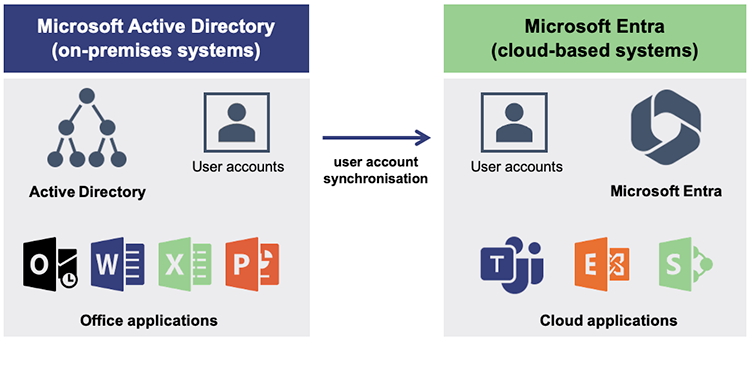
Queensland Audit Office based on Microsoft information.
Figure 2B details the specific control categories covered by our information system audits and included in our GITC maturity assessment.
Microsoft Active Directory control categories | Microsoft Entra control categories |
|---|---|
|
|
Queensland Audit Office from our 2024, 2025, and 2026 audits.
We used a 0–5 rating scale to perform the maturity assessment, based on Carnegie Mellon’s Capability Maturity Model (CMM) framework. The CMM framework and its categories are discussed in Appendix F.
We defined a target Level 2 (repeatable) maturity level, meaning that IT control processes exist with an appropriate level of documentation and tasks are repeatable. However, process and control gaps, weaknesses, or errors may exist. Level 2 (repeatable) represents a baseline target or expected minimum.
Level 3 (defined) represents a higher level of organisational maturity, where processes are standardised, defined, and documented, with minimal gaps or errors existing. Additionally, some level of automation may exist.
The maturity assessment should be interpreted and used as a tool for identifying practical and achievable improvement opportunities, not as an expectation that all organisations will attain the highest maturity level.
Entities have improved the maturity of their Microsoft Active Directory IT controls
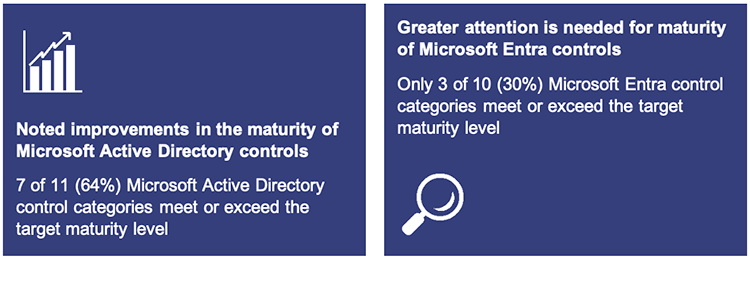
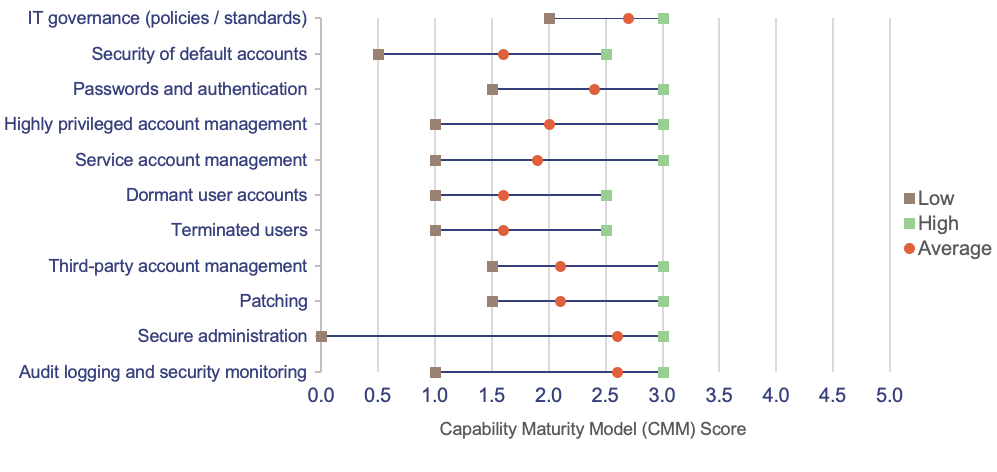
Over the 3-year period from 2024 to 2026, the 5 departments we assessed achieved an established, Level 2 (repeatable) maturity level or higher across most of their on-premises Microsoft Active Directory control categories. We found that 7 of 11 assessed Microsoft Active Directory control categories met or exceeded Level 2 maturity. This is an improvement from only 2 of 11 control categories meeting or exceeding Level 2 maturity in 2024.
While our maturity assessment considered only 5 departments, the themes and areas requiring attention are consistent with our audit results across other departments.
Figure 2C shows the average maturity assessment scores for the 5 departments for each of the 11 Microsoft Active Directory control categories.
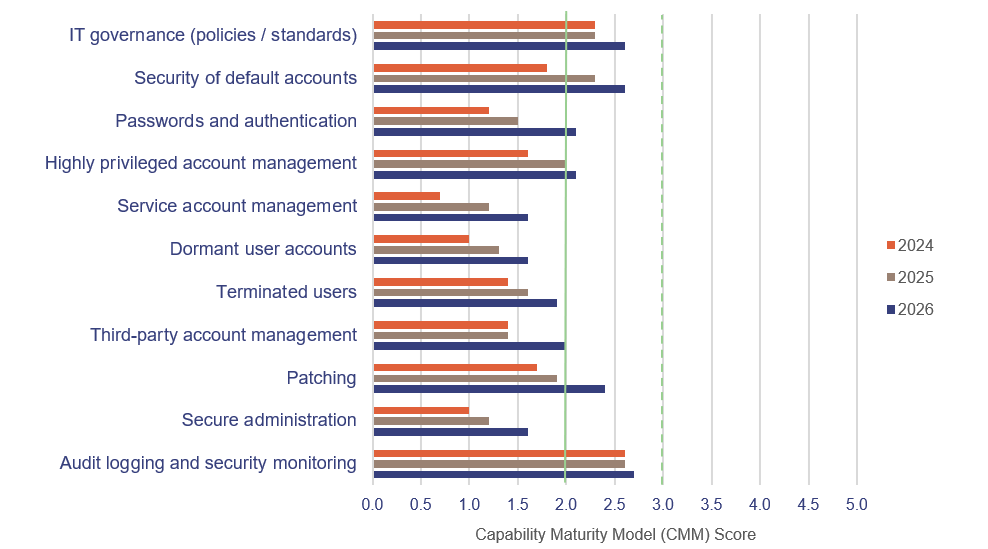
Note: The solid green line indicates the target Level 2 (repeatable) maturity while the dashed green line indicates the higher Level 3 maturity.
Queensland Audit Office from our 2024, 2025, and 2026 audits of 5 departments.
Figure 2D presents the 5 departments’ average maturity score for 2026 with the low and high score for each control. It highlights areas of potential weakness in maturity that may be unintentionally concealed by presenting only the average score.
Queensland Audit Office from our 2024, 2025, and 2026 audits of 5 departments.
Action is needed to address control categories not yet at the target maturity level
All entities should focus on improving their management of terminated and dormant user accounts and their management of service accounts. Figure 2E provides details of these areas for improvement.
| Control category | Entities should | |
|---|---|---|

| Service accounts Some entities have inventories of service accounts (machine or non-human accounts). However, there is inconsistent application of necessary security controls to secure these accounts. |
|

| Dormant accounts Entities have processes for identifying unused accounts, but effectiveness and monitoring of processes is not consistent. |
|

| Terminated accounts Entities have processes for terminated user accounts, but removing access for terminated users is often not timely. |
|

| Secure administration Entities use dedicated administration user accounts, separate from day-to-day user accounts. However, they do not use a secure administration system (controlled access system) to perform tasks. |
|
Queensland Audit Office from our 2024, 2025, and 2026 audits of 5 departments.
Figure 2F provides a case study to illustrate the importance of using a secure administration system for performing system administration tasks.
| Impact of not using a secure environment for performing system administration tasks |
|---|
Control maturity weakness: mixing daily work with system administration tasks When IT staff manage department computing environments, they use privileged user accounts. Cyber criminals target these specific user accounts. If:
Either scenario could allow the cyber-criminal unauthorised access to potentially sensitive information. Our maturity assessment found that many departments share a common, insecure practice: IT administrators often use their day-to-day computer, used for everyday tasks, to perform privileged system administration tasks. The day-to-day computer, used to browse the internet and read external emails, is at increased risk of compromise. Control maturity improvement: deploy and use a dedicated and secure management environment The Australian Cyber Security Centre (ACSC) notes that failing to isolate privileged user activities from internet‑facing devices allows cyber criminals an opportunity to obtain privileged user credentials. To improve the control maturity and mitigate this vulnerability, entities must deploy and enforce the use of separate, dedicated administrative devices. Guidance for this is detailed in ACSC's webpage on secure administration. |
Queensland Audit Office from our 2024, 2025, and 2026 audits.
|
| Opportunities for entities to improve Microsoft Active Directory control maturity Entities should:
|
Entities need to improve the maturity of their Microsoft Entra IT controls
The maturity of Microsoft Entra controls has not kept pace with the maturity of Microsoft Active Directory controls.
Over the 3-year period from 2024, 2025, and 2026, only 3 of 10 Microsoft Entra control categories met or exceeded the target maturity level. This leaves 7 control categories at an initial or ad-hoc maturity level.
Figure 2G shows the average maturity assessment scores for each of the 10 Microsoft Entra control categories.
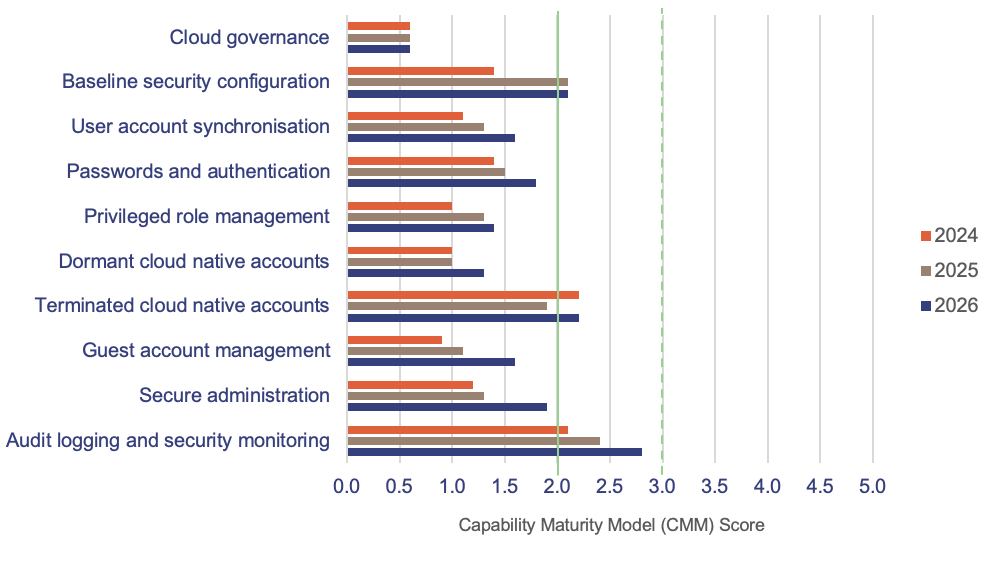
Note: The solid green line indicates the target Level 2 (repeatable) maturity while the dashed green line indicates the higher Level 3 maturity.
Queensland Audit Office from our 2024, 2025, and 2026 audits of 5 departments.
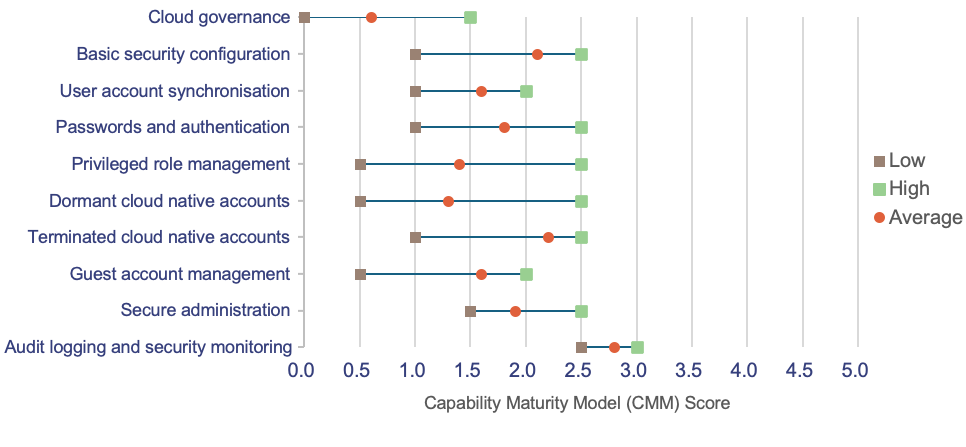
Figure 2H presents the average maturity score for 2026 with the low and high score for each control. It highlights areas of potential weakness in maturity that may be unintentionally concealed by presenting only the average score.
Queensland Audit Office from our 2024, 2025 and 2026 audits of 5 departments.
Greater focus is required to address weaknesses in overall control maturity
Common control areas that all entities should focus on to improve their Microsoft Entra control maturity are summarised in Figure 2I.
| Control category | Entities should |
|---|---|---|

| Cloud governance requirements Entities leverage their existing legacy IT control requirements and governance responsibilities. However, entities have not done the same for the newer cloud-based environments. |
|

| User account synchronisation Entities synchronise user accounts between on-premises Microsoft Active Directory and cloud-based Microsoft Entra. Entities have basic processes in place to enforce compliance. However, periodic reviews are not consistently performed. |
|

| Passwords and authentication Password configuration is aligned to documented requirements, and MFA is used to perform system administration tasks. |
|

| Privileged role management Privileged user access requires MFA. However, significant numbers of users possess highly privileged access; use of access is not strongly validated; and manual, not automated, privileged user‑access reviews occur. |
|

| Dormant cloud native accounts Entities have processes for identifying unused accounts, but effectiveness and monitoring of processes is not consistent. |
|

| Guest account management Security settings align with industry recommendations and guest user accounts are manually, but often inconsistently, reviewed for dormancy. |
|

| Secure administration Enforced use of MFA for administration is in place, but there is a lack of secure administration environment. |
|
Queensland Audit Office from our 2024, 2025, and 2026 audits of 5 departments.
Of these common control areas that require greater focus, 2 require specific attention: multi-factor authentication (MFA) and privileged role management.
Elevated risk of unauthorised access due to gaps in MFA enforcement
Most Queensland Government staff use cloud-based services every day to send emails, write documents, and access other departmental information. These cloud systems can hold large amounts of sensitive information, including personally identifiable data, internal policy plans, and confidential documents.
To access services and information, staff typically enter a username and a password. Passwords alone are no longer enough to keep this information safe. If a staff member’s password is somehow compromised, a cyber-criminal could use the credentials to gain unauthorised access to information.
Our maturity assessment found that some departments do not strongly enforce MFA for all users. MFA is an extra identity check, for example when someone receives an SMS message on their mobile phone when authenticating to their personal bank account.
To protect sensitive information, all departments should use MFA for every user account accessing its cloud-based services.
The ACSC states that compromised user credentials remain one of the most frequent vectors used by malicious actors to target government and enterprise systems. It highlights that using passwords alone leaves systems vulnerable to unauthorised access and it strongly urges entities to enforce MFA across all user accounts as a primary baseline control to block intruders from exploiting compromised credentials. For more information, see: www.cyber.gov.au/publication/personal-cyber-security-handbook/set-up-multi-factor-authentication.
Privileged role access is larger than required
In cloud-based computing environments, user accounts can be granted access to roles that give the user account various levels of privilege. Depending on the specifics of the role, a user can manage resources, modify credentials, configure security policies, or access restricted data.
Our maturity assessment found that many departments do not properly manage access and use of these privileged roles. Departments often assign staff permanent and active access rather than limiting access to the role for when a specific administrative task arises. This means the privileged user account maintains access permanently, even when the privileged account is not being used.
Departments frequently do not use just-in-time access, which temporarily grants privileged access only when requested and approved, and only for a specific period. In some instances, staff can switch on or request privileged access without even being authorised to use the privileges.
The ACSC warns that permanent or uncontrolled privileged access significantly increases an organisation’s exposure to system compromises. Failing to enforce role-governance controls allows malicious actors who obtain privileged account credentials to have potentially unfettered access to cloud‑based resources. Examples of role-governance controls include requiring justification, approval workflows, and strict MFA before role activation.
The ACSC’s advice to restrict administrative privileges highlights that traditional approaches, such as permanently assigning high-level access rights to staff members, fails to safely protect systems. For more information, see: www.cyber.gov.au/publication/restricting-administrative-privileges.
|
| Opportunities for entities to improve Microsoft Entra control maturity Entities should:
|
Maturity improvements require leadership support
Sustaining improvements and control maturity requires leadership support through the establishment of culture of improvement, risk reporting, and allocation of resources to the risk identified.
3. Financial system implementations
This chapter considers the financial management systems and the system upgrades for departments that are currently underway.
Departments use the SAP finance system. Queensland Shared Services (QSS) manages the SAP system on behalf of 16 departments. It is currently upgrading the system as the system and IT infrastructure will be out of support.
Chapter snapshot
State entities are upgrading or replacing their key finance systems
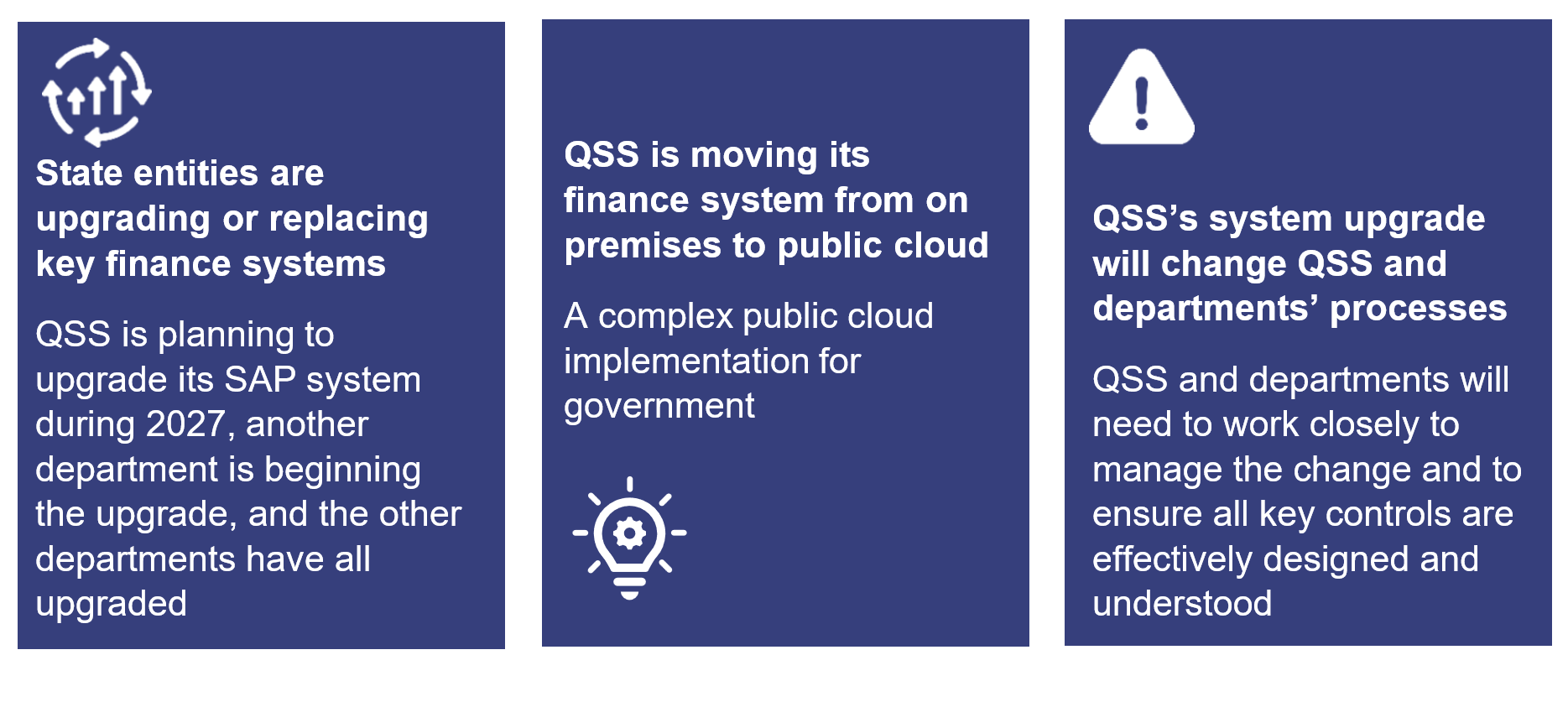
Many state entities use the SAP system to run their day-to-day businesses. SAP is an integrated system that can manage finance, purchasing, payroll, and asset management.
The older SAP ECC6 system is reaching its end of life. Mainstream support for SAP ECC6 will end in December 2027, with a negotiable option to extend support until December 2030 at an increased cost.
State entities are upgrading or have upgraded to the newer SAP S/4HANA to replace their SAP ECC6 finance system:
- QSS manages the finance system for 16 departments. QSS is in the process of upgrading to S/4HANA, which is currently expected during 2027. The upgrade will result in changed processes within the departments and QSS.
- Five departments manage their own finance systems. Of these, 4 have upgraded to S/4HANA and one is in the process of upgrading.
- State entities in the energy and water sector have upgraded to S/4HANA.
- One entity in the infrastructure sector is currently upgrading to S/4HANA.
QSS will upgrade to S/4HANA during 2027
QSS manages the finance system for 16 departments. It also uses its system to process transactions for other state entities through a shared service model. The transactions include accounts payable, accounts receivable, vendor and customer master data, assets, taxation, general ledger, and reporting.
QSS has used the SAP system since its formation in 2000. It has used SAP ECC6 since 2017.
QSS’s initial plan was to implement the upgrade to S/4HANA by 2026 in 2 releases, based on risk assessment and consultation with departments. In response to emerging risks and delivery challenges, the plan has been revised and is now expected to be completed in 2027.
QSS is moving its on-premises finance system to the public cloud
Currently, QSS uses an on-premises finance system, maintained through CITEC, which manages the IT infrastructure. QSS is implementing S/4HANA as a public cloud system.
The QSS implementation of S/4HANA will be the first time a Queensland Government department has used an SAP public cloud system to this extent.
In 2022, one department implemented a public cloud solution with SAP. This system provides a specialised procurement and supplier management component, not the full core functionalities of a finance system.
Figure 3A describes the features, benefits, and challenges of on-premises, private, and public cloud solutions.
| Delivery model | Description | Analogy | Benefit | Challenge |
|---|---|---|---|---|

On-premises system |
|
|
|
|

Private cloud |
|
|
|
|

Public cloud |
|
|
|
|
Queensland Audit Office.
The QSS implementation requires effective planning and risk management
The QSS implementation of a public cloud solution is significant, due to its size, complexity, and the number of entities involved. This type of change requires understanding of existing business processes, custom configurations, data quality, and ways of working. There is a commensurate change required in the supported entities.
QSS’s initial budget in 2024 for the implementation was $42 million. It was revised to $43 million in 2026. As of September 2026, it has spent $32 million.
Figure 3B details the areas of complexity that require planning and risk management.
Current state (on premises) | Need | Future state (public cloud) |
|---|---|---|
| 16 departments have different business processes and requirements | Effective ‘fit-to-standard’ exercises with all departments Effective coordination and communication with departments | Departments to use standard processes from the technology provider |
| 4,500 custom configurations accumulated over 2 decades | Effective needs analysis of existing custom configurations | Minimal customisation |
| Data collected over years contains duplicates, obsolete records, and historical errors | Effective data strategy, cleansing, transformation, and migration | New data model and structure |
| QSS processes transactions on behalf of departments | Operating model redesign and business (department) readiness | Departments responsible for processing transactions, requiring a new target operating model |
| QSS and CITEC share responsibilities for system maintenance | Understanding of roles and responsibilities and effective governance | SAP responsible for system maintenance and patching |
Queensland Audit Office from information provided by QSS.
Areas of focus for successful implementations
Drawing on our experience in auditing system implementations, we have identified areas of focus that QSS can use when assessing the implementation. Key areas of focus include:
- business requirements and scope
- business change and readiness
- schedule and delivery
- system testing and resolution of defects
- design and solution
- resourcing.
QSS have advised us that they are addressing risks and undertaking management action.
Two of our reports provide lessons learnt from previous system implementations in Queensland Government: Queensland Health’s new finance and supply chain management system (Report 4: 2020–21) and Effectiveness of the State Penalties Enforcement Registry ICT reform (Report 10: 2019–20). QSS can also benefit from other departments’ SAP implementations.
Figure 3C provides key risk indicators and questions entities could use when implementing new systems.
Key risk area | Key questions |
|---|---|
| Governance and leadership, including executive oversight |
|
| Strategy and business case |
|
| Business requirements and scope |
|
| Resourcing |
|
| Business change and readiness |
|
| Design and solution |
|
| System testing and resolution of defects |
|
| Schedule and delivery |
|
| Risk management and assurance |
|
| Technology and infrastructure |
|
Queensland Audit Office from our previous reports to parliament on system implementations.
4. Legacy systems
This chapter provides updated insights about legacy systems used by departments, extending the insights we provided last year.
The Queensland Government classifies a legacy system or technology as having one or more of these attributes:
- an age greater than the average age of all government systems
- past its end-of-use date
- classified as ‘retire’ or ‘streamline’ as part of the planning methodology for information and communication technology (ICT).
In 2025, the Queensland Government announced a $1 billion digital fund to drive a coordinated whole‑of‑government approach to digital investment and information technology (IT) systems. This includes legacy modernisation projects.
The Department of Customer Services, Open Data and Small and Family Business (CDSB) administers the digital fund.
Chapter snapshot
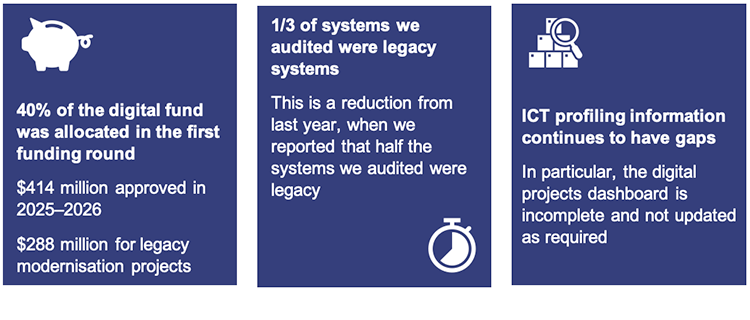
About 40 per cent of the $1 billion digital fund has been allocated
In the first funding round, the Queensland Government allocated $414 million to 11 projects, representing about 40 per cent of the total fund. A second funding round is underway. Figure 4A provides an overview of the digital fund’s timeline.
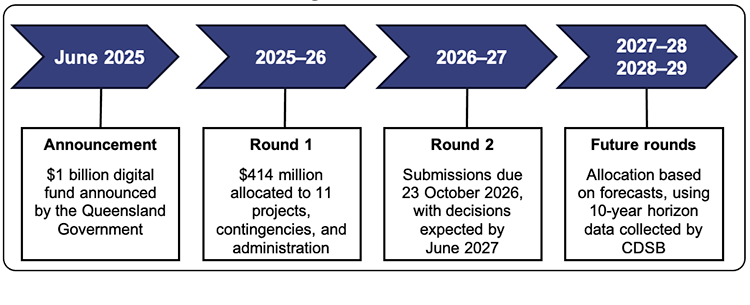
Queensland Audit Office from information provided by CDSB.
Figure 4B provides an overview of the government’s initial allocation of $414 million in 2025–26, including:
- $315 million in committed project funding to 8 entities for 11 projects – 10 of these are to replace legacy systems (modernisation)
- $90 million in contingency funding
- $9 million across 4 years for administrative and management activities.
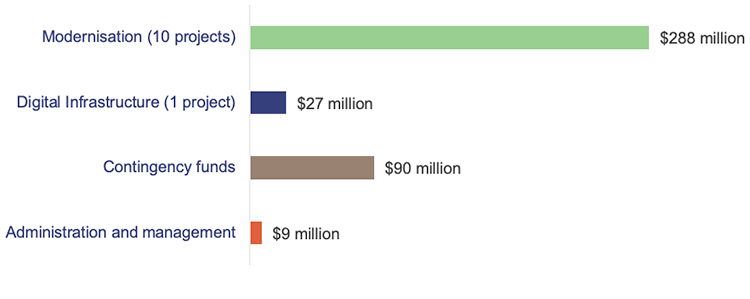
Queensland Audit Office from 2026–27 Budget Measures (Budget Paper No. 4) and information provided by CDSB.
Budget Paper No. 4 includes high-level information about each project, including information about funding for 10 of the 11 projects.
TRAILS (Transport Registration and Integrated Licensing System), a Department of Transport and Main Roads system, is not included in the information as contracts have not yet been awarded. This project will be co-funded by the Department of Transport and Main Roads and the digital fund. Figure 4C lists the funded projects.
Fund governance was refreshed in 2026
CDSB administers the digital fund with oversight from the Digital Queensland Investment Committee (DQIC), which comprises the Under Treasurer, the Directors-General of CDSB, and Department of the Premier and Cabinet.
The DQIC recently released a new digital investment and assurance framework, which details its approach to evaluating and prioritising digital initiatives and establishes governance committees.
Information about funded projects was not recorded in the digital projects dashboard
The digital projects dashboard is a publicly accessible resource that contains information about digital projects across all Queensland Government departments. It aims to provide transparent information about investments.
Data should be entered into the digital dashboard within 8 weeks. The 11 funded projects were included in Budget Paper No. 4, released on 23 June 2026. However, the allocated funding had not appeared in the dashboard until 15 September 2026, 12 weeks later.
Figure 4C shows the projects, digital fund allocation, and the status of information on the dashboard. This information is the total cost of change, not just technology or procurement costs.
| Department | Project | Digital fund allocation ($ mil.) | Digital projects dashboard |
|---|---|---|---|
| Department of Housing and Public Works | Queensland Building and Construction Commission Digital Transformation Roadmap | $15.2 | Not captured |
| Build to Enable Program | $37.2 | Captured, but budget not updated to reflect the digital fund allocation | |
| Department of Justice | Queensland Worker Screening | $5.7 | Not captured |
| Department of Local Government, Water and Volunteers | Digital Water Systems | $51.1 | Not captured |
| Department of Primary Industries | Replacement of the Forest Sales Management Information System | $8.8 | Captured, but budget not updated to reflect the digital fund allocation |
| Department of the Environment, Tourism, Science and Innovation | High-Performance Computing and Data Platforms | $26.7 | Not captured |
| Department of Transport and Main Roads | Registration and Licensing Modernisation | Not stated | Not captured |
| Queensland Health | Clinical Imaging Informatics Systems Replacement and Establishment of Enterprise Vendor Neutral Archive – Stage 1 | $63.5 | Not captured |
| Replacement of the Pathology Queensland Laboratory Information System | $30.5 | Not captured | |
| Corporate Enterprise SAP Re‑platforming | $28.1 | Not captured | |
| Queensland Police Service | Disaster Event Management System Replacement | $6.1 | Not captured |
Queensland Audit Office from the digital dashboard (accessed 15 September 2026) and budget paper.
The new digital investment forecast aims to reduce legacy risk
Previously, departments submitted annual ICT work plans to CDSB to enable a whole-of-government view of ICT investments and planned initiatives. From this financial year, the new Digital Investments Forecast (the forecast) replaces those work plans.
The forecast will provide a 10-year outlook of current, planned, and prospective digital and ICT initiatives. One of its stated objectives is to reduce the risk of investing in outdated or soon-to-be-obsolete technologies.
Departments are required to submit forecast data to CDSB twice a year – in October and April. The first submission was due by 31 October 2026. CDSB expects this information to enhance whole‑of‑government ICT planning, coordination, and decision-making.
ICT profiling information continues to have gaps
ICT profiling is a regular program of data gathering and analysis conducted by CDSB to support whole‑of‑government objectives. The ICT profiling standard identifies information that departments should report centrally, including:
- at-risk data – collected in June and December about systems deemed strategically important and at a high or extreme risk to the business
- ICT resources – collected in June to list all systems used by departments
- digital projects dashboard – collected every 4–6 weeks, with an 8-week maximum reporting timeline, to provide a publicly accessible dataset about digital projects across departments.
Information about projects is not always recorded in the digital projects dashboard as required
In the digital projects dashboard, some projects are captured late, and some are not updated regularly. Examples include:
- the $15 million Forestry Systems Continuity Project (Stage 1) for the Department of Primary Industries, which started in April 2023 but was first reported in January 2026, after half the approved budget had been spent
- the $25 million Enterprise Data Platform Project for the Department of Education, which started in July 2023 but was first reported in June 2026, after 60 per cent of the approved budget had been spent
- the $194 million Build to Enable Project for the Department of Housing and Public Works has been in the dashboard since May 2024. However, as at 15 September 2026, the most recent update was provided on 30 May 2026 (15 weeks old). The project received $37.2 million from the digital fund in 2025–26.
|
| Opportunities to improve the reporting process CDSB should:
Departments should:
|
The number of systems at extreme risk has remained the same, with some systems dropping off the list and new ones added
Departments reported 29 systems at extreme risk in June 2026, the same number reported in June 2025. However, the makeup of the list changed, as detailed in Figure 4D.
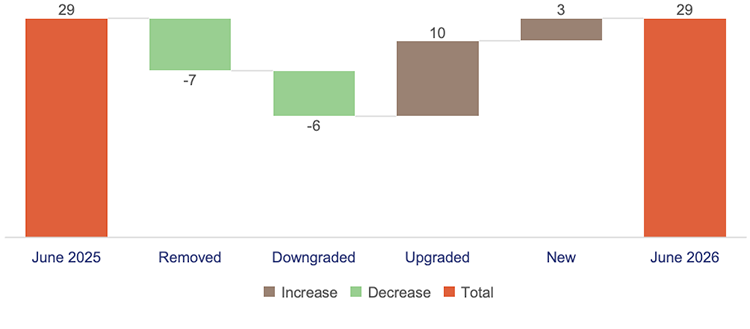
Queensland Audit Office from the at-risk systems listing.
Some departments are closing legacy gaps, but departments do not manage risks consistently
In 2025, we reported that half of the systems we audited were legacy systems. In 2026, this has reduced to one third, mainly due to upgrades of applications or supporting infrastructure to newer, supported versions.
Departments do not manage legacy risks consistently
The case study in Figure 4E shows the different ways that 2 departments manage legacy deficiencies.
| Departments accepting the risk associated with legacy systems |
|---|
Departments often have audit deficiencies that cannot be remediated because the relevant systems are old. One of the systems we audit has been at-risk since 2023, with a large program of work underway to modernise it. For some of the associated deficiencies, the department elected to accept the risk without implementing mitigating controls. The risk acceptance has not been formally documented. This is not optimal, as the department’s risk acceptance is not properly supported and communicated. A different department has several legacy systems, with projects initiated to modernise them. This department formally documents the risk acceptance process for each deficiency. Management submits a paper to the department’s audit and risk committee to provide its risk acceptance rationale. The risk is accepted if the committee agrees. This is a better practice. |
Queensland Audit Office from our 2025–26 audits.
|
| Opportunities for departments to strengthen their risk-acceptance processes Departments should:
|
Our performance audit Managing the risks of aging technology is underway. In this audit, we will assess how effectively selected entities manage the risks associated with legacy IT infrastructure and systems.